We've done a bunch of work to leverage PowerShell to completely automate our SQL Server and SSIS deployments. This includes the management of ISPAC and DACPAC packages respectively. I'd like to share this work with everyone at my blog repo, and specifically here.
I must note the overall approach is a DBA-centric one. The modules make heavy use of SSISDB and the other packaging executables. We did this instead of using the C# centric API. The largest problem with not using that API is that when things change, the modules will have to change. The trade-off is now we have something that can be expanded upon by savvy DBAs, which in my opinion is the audience for these modules.
The modules can be had under the Attribution-ShareAlike Create Commons license. Please let me know if you are having success with the modules. So now onto the good part, what's included?!?
SqlDeploy.psm1 - a few common functions leverages by all the modules
DacPacDeploy.psm1 - all things DACPAC. Includes drift reporting and creating sql scripts.
IsPacDeploy.psm1 - all things ISPAC. Deploy, create environments, map variables etc.
SSISPS.psm1 - this controls package execution.
I hope these modules can help people out, send a comment if you find them useful!
Monday, March 23, 2015

Tuesday, September 30, 2014
Monday, June 3, 2013
DataBus Compression
We have a requirement to be a bit conservative about our network traffic. We are using the DataBus to move larger data elements to distributed locations. My first attempt was to implement a transport message mutator to perform some compression, but it did not compress the DataBus properties.
Come to find out, those are stripped after the file is written to disc, so the compression never hits. What I found to be the simplest thing to do is to just override the IDataBus/FileShareDataBus altogether. IDataBus has a couple of simple methods, Get and Put to override. I used the existing FileShareDataBus as a model and just injected some simple compression. Let's start with Put:
Note that all I really did was slip in the GZipStream. Now for Get:
Lastly all we need is a little bit of configuration magic:
Now we have a heck of a lot less data on the network...enjoy!
Come to find out, those are stripped after the file is written to disc, so the compression never hits. What I found to be the simplest thing to do is to just override the IDataBus/FileShareDataBus altogether. IDataBus has a couple of simple methods, Get and Put to override. I used the existing FileShareDataBus as a model and just injected some simple compression. Let's start with Put:
        public string Put(Stream stream, TimeSpan timeToBeReceived)
        {
            var key = GenerateKey(timeToBeReceived);

            var filePath = Path.Combine(basePath, key);

            Directory.CreateDirectory(Path.GetDirectoryName(filePath));

            var outStream = new FileStream(filePath, FileMode.CreateNew);

            using (var tinyStream = new GZipStream(outStream, CompressionMode.Compress))
            {
                var buffer = new byte[32 * 1024];
                Int32 read = 0;

                while ((read = stream.Read(buffer, 0, buffer.Length)) > 0)
                {
                    tinyStream.Write(buffer, 0, read);
                }
            }

            return key;
        }
Note that all I really did was slip in the GZipStream. Now for Get:
        public Stream Get(String key)
        {
            var bigStreamOut = new MemoryStream();

            using (var bigStream = new GZipStream(File.OpenRead(Path.Combine(this.basePath, key)), CompressionMode.Decompress))
            {
                bigStream.CopyTo(bigStreamOut);
            }

            bigStreamOut.Position = 0;

            return bigStreamOut;
        }
Lastly all we need is a little bit of configuration magic:
    public static class ConfigureCompressedFileShareDataBus
    {
        public static Configure CompressedFileShareDataBus(this Configure config, String basePath)
        {
            var bus = new CompressedFileShareDataBus(basePath);

            config.Configurer.RegisterSingleton<IDataBus>(bus);

            return config;
        }
    }
Now we have a heck of a lot less data on the network...enjoy!
Thursday, February 21, 2013
Tuesday, February 12, 2013
NSB Custom Fault Handling in 15 Minutes
We had a need to divert some of our exceptions over to a level 2 help desk. The help desk would then either fix the problem on behalf of the customer or initiate contact with the customer to fix the problem. We implemented a custom fault handler and it really only took 15 minutes.
You must be aware that when you take control of the faults, it is up to you to handle all scenarios and in fact SLRs will not work. In our case, that doesn't really matter since the majority of our exceptions will be handled by a person with this new process.
First we started out by adding some custom config to wire up the handler. We wanted to maintain the existing process for exceptions that the help desk would not handle, so we borrowed the code from the forwarding handler.
Now we can just simply add that to our endpoint config.
Lastly, all we need to do is implement the interface and decide base on the exception where it should end up. With this, we are DONE!
You must be aware that when you take control of the faults, it is up to you to handle all scenarios and in fact SLRs will not work. In our case, that doesn't really matter since the majority of our exceptions will be handled by a person with this new process.
First we started out by adding some custom config to wire up the handler. We wanted to maintain the existing process for exceptions that the help desk would not handle, so we borrowed the code from the forwarding handler.
public static Configure ForwardToHelpDeskInCaseOfFault(this Configure config)
{
      ....//left out for brevity
 config.Configurer.ConfigureComponent<HelpDeskFaultHandler>(DependencyLifecycle.InstancePerCall)
                .ConfigureProperty(fm => fm.ErrorQueue, ErrorQueue);

      return config;
}
Now we can just simply add that to our endpoint config.
.ForwardToHelpDeskInCaseOfFault();
Lastly, all we need to do is implement the interface and decide base on the exception where it should end up. With this, we are DONE!
 public class HelpDeskFaultHandler : IManageMessageFailures
    {
        private Address localAddress;
        private static readonly ILog Logger = LogManager.GetLogger("WebGateway.HelpDeskFaultHandler");

        public Address ErrorQueue { get; set; }

        public void Init(Address address)
        {
            this.localAddress = address;
        }

        public void ProcessingAlwaysFailsForMessage(TransportMessage message, Exception e)
        {
            this.SendToHelpDesk(message, e, "ProcessingFailed");
        }

        public void SerializationFailedForMessage(TransportMessage message, Exception e)
        {
            this.SendToErrorQueue(message, e, "SerializationFailed");
        }

        private void SendToErrorQueue(TransportMessage message, Exception e, String reason)
        {
            ...//left out for brevity
        }

        private void SendToHelpDesk(TransportMessage message, Exception e, String reason)
        {
            if ( e.GetType().IsAssignableFrom(typeof(MyCustomException)))
            {
                try
                {
                    HelpDeskException hd = new HelpDeskException(message, e.Message);
                    hd.Save();
                }
                catch (Exception ex)
                {
                    Logger.Warn("Failed to send to help desk, sending to error queue", ex);
                    this.SendToErrorQueue(message, e, "SendToHelpDeskFailed");
                }
            }
            else
            {
                this.SendToErrorQueue(message, e, reason);
            }
        }

        private void SetExceptionHeaders(TransportMessage message, Exception e, String reason)
        {
            ...//left out for brevity
        }
    }
Monday, December 17, 2012
NSB PowerShell Support in v3.3
Looks like this is the answer to my request for granular control over infrastructure installation. This works for me as PowerShell is our common denominator for our developers and admins.
After getting through the new MSI installer, you will see a new short cut to a prompt.


I'm runing Windows 7 Enterprise and you will get an error OOTB

To get rid of this error you have to install PowerShell v3. I won't show examples of all the commands available, but we do now have full control over what is installed. Here is a listing of what is available:
Get-Message
Get-NServiceBusVersion
Install-Dtc
Install-License
Install-Msmq
Install-PerformanceCounters
Install-RavenDB
I think all of these are pretty self explanatory. The great news is this takes care of allowing you to install only what you need instead of everything in the kitchen sink.
Monday, September 24, 2012
All I wanted was Perf Counters
We've been busy upgrading our endpoints and therefore there have been some reinstalls. NSB has some perf counters built-in to help you understand the relative health of your endpoint, (you can add your own). We still wanted those and therefore ran the Infrastructure installers. Then the fun started.
Much to our admins chagrin, MSMQ got re-installed along with RavenDB(which we don't use). Everyone got all grumpy so I went off into the code(3.2.6) to check and make sure we had everything straight. Here is the summary I gave to our admins:
Runmefirst.bat – this runs NServiceBus.Host.exe with the “/installInfrastructure” switch. This will install anything if it is not there or does not meet its requirements.
NServiceBus.Host.exe – when installing the windows service, you can also use the “/installInfrastructure” switch.
All OOTB profiles have “RunInfrastructureInstallers” = false. A custom profile can control this and be able to choose whether to run the install or not.
When it comes to perf counters, it used to be the case that on startup if they didn’t exist, they would be created. In v3, the installation stuff has been moved and will pick up anything that implements a given interface. I don’t see a way currently to pick and choose what gets installed OOTB.
So my advice would be to avoid running the infrastructure installers and we’ll just create a powershell script, or a custom profile, to isolate the perf counter install.
Here is a sample of the script(non-validated) that I gave them:
$pc = New-Object NServiceBus.Unicast.Monitoring.PerformanceCounterInstaller $pc.Install([WindowsIdentity]::GetCurrent());To follow up we opened a issue to get granular control over installation of infrastructure specifically.
Wednesday, August 29, 2012
Unobtrusive Mode - ASP.NET is Gonna Get-cha
We are using NSB as a send only endpoint in a REST style service hosted in ASP.NET. We are using unobtrusive mode and thought it would be easiest to identify our messages via using the assembly name itself. We unit tested fine, and our server side worked, but the client side just failed.
We forgot about the whole dynamic compilation thing in ASP.NET. So we had some choices we could either go with fixed names or we could change our convention. We went with the latter. So be aware when you're dealing with ASP.NET.
Wednesday, July 11, 2012
Running 3.x Old School
I've run into a few interesting things that I thought I'd call out after running through an upgrade on my demo project. Here at work we want to run 3.x as we were running 2.x, but this takes some work. There are a couple of things you need to take care of.
NHibernate Persistence Requires Different Assemblies
In order to go back to NH persistence you need to pull in the NServiceBus.NHibernate package separately. You will also need to create your own profile that default to these settings.
        public void ProfileActivated()
        {
            if (!Configure.Instance.Configurer.HasComponent<ISagaPersister>())
                Configure.Instance.NHibernateSagaPersister();

            if (!Configure.Instance.Configurer.HasComponent<IManageMessageFailures>())
                Configure.Instance.MessageForwardingInCaseOfFault();

            if (Configure.Instance.IsTimeoutManagerEnabled())
                Configure.Instance.UseNHibernateTimeoutPersister();

            if (Config is AsA_Publisher && !Configure.Instance.Configurer.HasComponent<ISubscriptionStorage>())
                Configure.Instance.DBSubcriptionStorage();
        }
SLRs and Timeouts Creates Extra Queues
These features require extra queues that you didn't have in 2.x, so these need to be disabled via custom initialization.
        public void Init()
        {
            Configure.With()
                .DefaultBuilder()
                .XmlSerializer()
                .DisableSecondLevelRetries()
                .DisableTimeoutManager();
        }
Timeout Persistence Moved to the Database
There is no more MSMQ timeout persistence, so if you want this back, you'll need to implement it yourself. This should be as simple as going back into the code and copying out the code.
Thursday, April 12, 2012
NSB 3 Upgrade Continued
I finally got back around to my demo solution. We run the Distributor as a stand-alone and would like to continue to so therefore I thought it would be good to validate that setup on 3.0. The configuration and setup is much improved since you don't need any special dlls anymore. The one thing you will run into is that when running in this mode, it is assumed that you will run the Distributor on another machine. This is fine, but you'll need a license and if you don't have one, you'll need to get a temporary one.
Monday, March 12, 2012
NServiceBus 3.0 Upgrades
For those upgrading to the 3.0 RTM, please check out this video. I've been upgrading my demo solution to check out the impact and so far all I've really had to do is name my endpoints and remove some config per the video. Thus far I've gotten my version of Full Duplex working along with basic Pub/Sub. Next I'll be hitting the Distributor since we use that pretty heavily. I'll be sure to post back any gotchas that I find.
Thursday, January 12, 2012
JSON Serializer in NSB 3.0
I was answering a question over on SO and I discovered that there is a JSON/BSON serializer built-in to 3.0. It seems like it would be possible with a a bit more digging that you could build upon my hack to expose NSB as a REST endpoint and skip the WCF serialization and jump right down into NSB(assuming WCF is configured to use the JSON format).
Tuesday, December 27, 2011
NServiceBus Modeling Tools Review
After downloading and installing the package, the first thing that we have to do is create a new NSB application. So where is it? I expected it to be in a custom NServiceBus folder under Visual C#, but it wasn't. Then I tried Windows thinking that since we deploy as a Windows Service, it would be there. Nope. Modeling Projects? Nope. So then I did a search and found it at the Visual C# root. I eventually found it, but I'm hoping this moves somewhere more obvious. I'm also curious about the term "application". In the Advanced Distributed System Design course we talked at length on how an application is something that does not require network access, something like Microsoft Word. I'm thinking this should be changed to "System" instead.
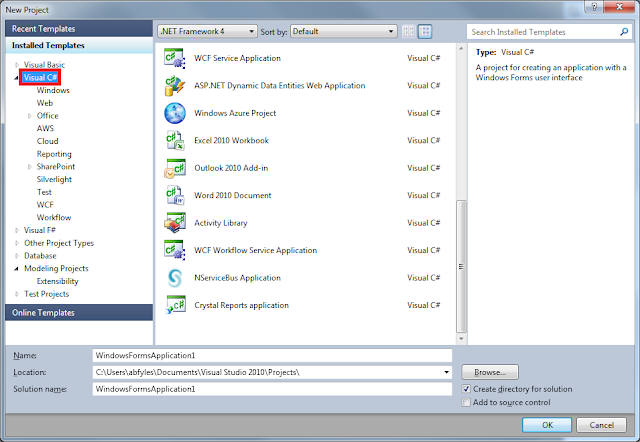 It takes you right into the designer canvas which is nice. In the toolbox we have a pretty small set of items, a couple of message types, matching connectors, and two endpoints. I'm going to try to set up a simple send-only client that in turn publishes to a couple of subscribers.
 Somehow my references are busted, so I opened the project to see the path and it's referencing some MSBuild variable, so I just updated all the refs. I'm not sure what the bug is here, but I'll blow right by it.
 Now that we've generated the system, let's go and see what it did. So far the Client looks just fine:
 All the message classes look fine and I'm glad to see that the commands are separated from the events into different assemblies. I'm also glad to see that the Publisher is defined correctly:
 I didn't think it would do that based on the canvas. I would like to see a larger group of endpoints that are defined based on there role. This would include Publisher, Subscriber, Distributor, Worker, and Server. This would make it very obvious to the beginner what they are building. The Subscribers are also defined correctly:
 It would also be nice if the endpoint configuration matched what was on the canvas, in this case that would be "AsA_Subscriber". Most people that I've helped to learn NSB get a little caught up on what the endpoints can do. If we added "AsA_Subscriber" we could also do some validation on the subscription itself(depending on the profile).
All in all, this is a huge step forward. Congratulations to the team for significantly lowering the barrier to entry to getting started. I'd like to see some of the refinements I mentioned above and also would like some Distributor support(I'm sure that is on the list).
It would also be nice if the endpoint configuration matched what was on the canvas, in this case that would be "AsA_Subscriber". Most people that I've helped to learn NSB get a little caught up on what the endpoints can do. If we added "AsA_Subscriber" we could also do some validation on the subscription itself(depending on the profile).
All in all, this is a huge step forward. Congratulations to the team for significantly lowering the barrier to entry to getting started. I'd like to see some of the refinements I mentioned above and also would like some Distributor support(I'm sure that is on the list).


Tuesday, December 20, 2011
Monday, October 31, 2011
NServiceBus Modeling Tools Video
I just gave this a look and the tools really lower the barrier to entry to "getting on the bus". I'm going to take some time this week and give it a full evaluation and I'll post that back here. For now, enjoy the video.
NServiceBus Modeling Tools for Visual Studio from NServiceBus Ltd. on Vimeo.
Thursday, July 21, 2011
The Great Worker Pile Up Problem: Solved!

In our configuration of the Distributor pattern, we have the Distributor clustered across multiple VMs. We also run Workers on separate nodes in the same cluster. We are doing this so that we can deploy the same image to all nodes. With this configuration any Distributor/Worker can move from one node to the other in case of a failure. With all this sliding of nodes around we ran into one main issue.
Everything worked great up until we had the big pile up. What would happen is we would intentionally drop all the nodes in succession until we got down to one node. Usually this node would have the Distributor already there and Worker1 would slide over. No problems. When Worker2 slid over to that node all of a sudden one of the Workers would take itself out of business, all the work would move to the other Worker and then we'd have a couple messages disappear. Disappear temporarily that is. Eventually they would come back and be processed.
We initially thought this was due to MSDTC since we saw messages that weren't get ack'd hanging out. After chasing this awhile we then figured it must be some networking issue. Like just about any clustered VM we have 2 NICs configured on the VM, one for the SAN and one for everything else. Come to find out when the last Worker slid over, it was picking up the NIC for the SAN and not the general network. Therefore the messages weren't getting ack'd, but eventually they'd find their way back.
We tried setting the priority of the NICs and so on to no avail. After speaking with MS, we ended up pinning the IPs of the local machines in the registry to the correct network interface. We also had to do this on the clustered services as well. Now when the nodes slide about the local IPs don't change and we have a script that the services depend on that updates the clustered IPs if necessary(like when you change data centers).
I'd like to that our team for being persistent and finally tracking this one down. Now we can deploy the same image to all nodes and have them move about freely. Everything works as designed with full load balancing.
Friday, May 6, 2011
Introducing NServiceBus Visual Studio Templates
I really got tired of creating the same projects over and over so I decided to create some templates. I packaged them up and put them on the Visual Studio Gallery: http://visualstudiogallery.msdn.microsoft.com/9546d382-7ffa-4fb8-8c0f-b7825d5fd085
Right now it only includes a few project templates and a few items. If you are using the project templates there is a custom wizard that will prompt you for a path to the NSB binaries. This will auto adjust the HintPath in the project file to point to that directory.
I'm planning on adding more endpoints and some complete solutions in the near future. Let me know what you are looking for via the gallery so I can keep track of it there.
Right now it only includes a few project templates and a few items. If you are using the project templates there is a custom wizard that will prompt you for a path to the NSB binaries. This will auto adjust the HintPath in the project file to point to that directory.
I'm planning on adding more endpoints and some complete solutions in the near future. Let me know what you are looking for via the gallery so I can keep track of it there.
Wednesday, April 27, 2011
More Reasons Working with NServiceBus is Just Easier than WCF over MSMQ
We have some teams that went down the route of using WCF over MSMQ. Using a durable transport was the right thing to do for their process(accepting orders). We ran into a few issues along the way and had we used NSB to start with, we would have just avoided them.
IIS/WAS Hosting
We *thought* this would be a no brainer, but it really wasn't. Come to find out, if something goes wrong or your app pool recycles(every 24 hours or so guaranteed), you need to "warm-up" the service before it accepts messages. So Microsoft's answer to this is a warm-up extension to IIS or to host the service as a Windows Service. I think hosting in a Windows Service is a much better idea anyway as we weren't really using any of the IIS features anyway on the MSMQ transport. The thing is, had we used NSB out of the box we'd never have encountered such an issue.
Windows Service Hosting
Hosting this way gets you out of the warm-up jam. Unfortunately there is another problem if your shop uses SCOM like we do for monitoring. We haven't been able to get SCOM to monitor on the poison sub queues that WCF creates to put bad messages. We have some choices, which are call on MS to get this to work, build our own monitor, or just switch to NSB. I prefer the latter as we already have plenty of endpoints that we monitor just fine.
Summary
If you are thinking of using WCF over MSMQ make sure you host in a windows service and have a plan for when bad things happen. To us it makes sense to just retrofit those endpoints to NSB and avoid all the issues completely.
IIS/WAS Hosting
We *thought* this would be a no brainer, but it really wasn't. Come to find out, if something goes wrong or your app pool recycles(every 24 hours or so guaranteed), you need to "warm-up" the service before it accepts messages. So Microsoft's answer to this is a warm-up extension to IIS or to host the service as a Windows Service. I think hosting in a Windows Service is a much better idea anyway as we weren't really using any of the IIS features anyway on the MSMQ transport. The thing is, had we used NSB out of the box we'd never have encountered such an issue.
Windows Service Hosting
Hosting this way gets you out of the warm-up jam. Unfortunately there is another problem if your shop uses SCOM like we do for monitoring. We haven't been able to get SCOM to monitor on the poison sub queues that WCF creates to put bad messages. We have some choices, which are call on MS to get this to work, build our own monitor, or just switch to NSB. I prefer the latter as we already have plenty of endpoints that we monitor just fine.
Summary
If you are thinking of using WCF over MSMQ make sure you host in a windows service and have a plan for when bad things happen. To us it makes sense to just retrofit those endpoints to NSB and avoid all the issues completely.
Wednesday, April 6, 2011
NServiceBus Customization Part 2: IWantToRunAtStartup
When NSB starts up it will look for all implementors of the interface IWantToRunAtStartup and call their Run() methods. When NSB spins down it will also call the Stop() method of the same interface. This gives us a good place to run expensive one time initialization code or to tweak out the bus prior to getting going. A common usage of this interface is for the manual subscription to specific message types:
public IBus Bus { get; set; }

        #region IWantToRunAtStartup Members

        public void Run()
        {
            this.Bus.Subscribe<IProductUpdatedEvent>();
            this.Bus.Subscribe<IProductCreatedEvent>();
        }

        public void Stop()
        {
            this.Bus.Unsubscribe<IProductUpdatedEvent>();
            this.Bus.Unsubscribe<IProductCreatedEvent>();
        }

        #endregion
One thing that I would caution against doing in the Run() method is not exiting the method. I've seen cases where someone will go into an infinite loop and never exit Run(). Typically this is done to perform a task on a given interval. There are much better ways to do this, mostly commonly you can put a Timer into the container and wire into its events. If you never leave the Run() method, the Bus doesn't ever really startup and you will get some odd results.
Friday, April 1, 2011
NServiceBus 3.0 Details
The following content is paraphrased from the Yahoo Group:
Second, there's the Data Bus feature that Andreas Öhlund (http://andreasohlund.net/) has been working on. As many of you know, most queuing transports have a limit on the size of message they can deliver - with MSMQ this is 4MB, with Azure it's 8KB. The Data Bus will allow you to transmit messages of an almost arbitrary size as it transmits the "data" portion on a separate infrastructure than the actual message. This is currently implemented using the file system but will be done using a database (RavenDB) as well - more on that in just a minute. The thing is that between remote sites, there often isn't the ability to have a shared file system or database, as the sites may not always be connected to each other. In order to resolve this issue, Andreas is also working on the Gateway to make it Data Bus aware - that and also able to support transports other than HTTP, like TCP and FTP. Third, there's the Azure integration that Yves Goeleven has been driving for some time now. For all those of you who've been looking for a simpler developer experience on Azure, Yves has really done it, abstracting away almost all of the underlying complexity behind your standard NServiceBus interfaces. You can find out more about this through his series of blog posts here:http://cloudshaper.wordpress.com/
The integration of RavenDB will enable us to stop merging NHibernate, but we'll still integrate with it out of the box. This will make it much easier for you to plug in your own version of NH instead of ours. Fifth is the Timeout Manager - one of the areas of NServiceBus that hasn't been as strong as the others. Jonathan Oliver (http://blog.jonathanoliver.com/ who has been ramping up his involvement over the past while) will be using our new RavenDB persistence to replace the use the input queue, which will dramatically increase the performance and robustness of the Timeout Manager.
Finally, the 3.0 release schedule looks something like this - Alpha by the end of April (primarily focusing on APIs), Beta in July, and a Release (or at least release candidate you can go live with) in September.
First of all, I'd like to talk about the thing that will influence you the most. We're making every effort to make the use of NServiceBus (particularly it's auxiliary processes like the Timeout Manager, Distributor, and Gateway) much, much easier. What this means is removing much of complexity of using these capabilities by hosting them within the same host as your own process, but don't worry, we'll make it easy for you to turn them on and off using profiles. This will enable us to configure all the routing to these processes for you, but if you want, you can always go back to the manual approach in version 2.x. This is where I'll be investing most of my time.
Fourth is RavenDB integration. I'm happy to say that a licensing agreement has been reached that will allow users of NServiceBus Standard Edition to use RavenDB for things like Subscription Storage and Saga Persistence at no additional cost. This will save you from having to haggle with your DBAs anytime you want production-ready storage for NServiceBus - it'll give you a much more cohesive deployment without worrying about overloading your existing relational databases. I'm happy to welcome one of our newest committers, Jonathan Matheus (http://www.linkedin.com/in/jonathanmatheus), who is making this happen.
We're also looking at stronger Visual Studio integration, possibly to the level of providing model-driven code/config generation. We'll see if it's feasible to get that done within the 3.0 timeframe, or whether that will be delivered as a separate download afterwards.
Subscribe to:
Posts (Atom)