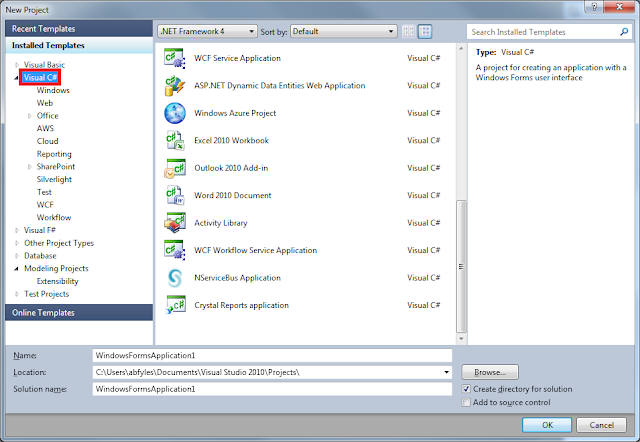
After downloading and installing the package, the first thing that we have to do is create a new NSB application. So where is it? I expected it to be in a custom NServiceBus folder under Visual C#, but it wasn't. Then I tried Windows thinking that since we deploy as a Windows Service, it would be there. Nope. Modeling Projects? Nope. So then I did a search and found it at the Visual C# root. I eventually found it, but I'm hoping this moves somewhere more obvious. I'm also curious about the term "application". In the Advanced Distributed System Design course we talked at length on how an application is something that does not require network access, something like Microsoft Word. I'm thinking this should be changed to "System" instead.
It takes you right into the designer canvas which is nice. In the toolbox we have a pretty small set of items, a couple of message types, matching connectors, and two endpoints. I'm going to try to set up a simple send-only client that in turn publishes to a couple of subscribers.
Somehow my references are busted, so I opened the project to see the path and it's referencing some MSBuild variable, so I just updated all the refs. I'm not sure what the bug is here, but I'll blow right by it.
Now that we've generated the system, let's go and see what it did. So far the Client looks just fine:
All the message classes look fine and I'm glad to see that the commands are separated from the events into different assemblies. I'm also glad to see that the Publisher is defined correctly:
I didn't think it would do that based on the canvas. I would like to see a larger group of endpoints that are defined based on there role. This would include Publisher, Subscriber, Distributor, Worker, and Server. This would make it very obvious to the beginner what they are building. The Subscribers are also defined correctly:
It would also be nice if the endpoint configuration matched what was on the canvas, in this case that would be "AsA_Subscriber". Most people that I've helped to learn NSB get a little caught up on what the endpoints can do. If we added "AsA_Subscriber" we could also do some validation on the subscription itself(depending on the profile).
All in all, this is a huge step forward. Congratulations to the team for significantly lowering the barrier to entry to getting started. I'd like to see some of the refinements I mentioned above and also would like some Distributor support(I'm sure that is on the list).
Tuesday, December 27, 2011
Tuesday, December 20, 2011
NServiceBus 3.0 Beta 1
You can download 3.0 from here
Monday, October 31, 2011
NServiceBus Modeling Tools Video
I just gave this a look and the tools really lower the barrier to entry to "getting on the bus". I'm going to take some time this week and give it a full evaluation and I'll post that back here. For now, enjoy the video.
NServiceBus Modeling Tools for Visual Studio from NServiceBus Ltd. on Vimeo.
Thursday, July 21, 2011
The Great Worker Pile Up Problem: Solved!
In our configuration of the Distributor pattern, we have the Distributor clustered across multiple VMs. We also run Workers on separate nodes in the same cluster. We are doing this so that we can deploy the same image to all nodes. With this configuration any Distributor/Worker can move from one node to the other in case of a failure. With all this sliding of nodes around we ran into one main issue.
Everything worked great up until we had the big pile up. What would happen is we would intentionally drop all the nodes in succession until we got down to one node. Usually this node would have the Distributor already there and Worker1 would slide over. No problems. When Worker2 slid over to that node all of a sudden one of the Workers would take itself out of business, all the work would move to the other Worker and then we'd have a couple messages disappear. Disappear temporarily that is. Eventually they would come back and be processed.
We initially thought this was due to MSDTC since we saw messages that weren't get ack'd hanging out. After chasing this awhile we then figured it must be some networking issue. Like just about any clustered VM we have 2 NICs configured on the VM, one for the SAN and one for everything else. Come to find out when the last Worker slid over, it was picking up the NIC for the SAN and not the general network. Therefore the messages weren't getting ack'd, but eventually they'd find their way back.
We tried setting the priority of the NICs and so on to no avail. After speaking with MS, we ended up pinning the IPs of the local machines in the registry to the correct network interface. We also had to do this on the clustered services as well. Now when the nodes slide about the local IPs don't change and we have a script that the services depend on that updates the clustered IPs if necessary(like when you change data centers).
I'd like to that our team for being persistent and finally tracking this one down. Now we can deploy the same image to all nodes and have them move about freely. Everything works as designed with full load balancing.
Friday, May 6, 2011
Introducing NServiceBus Visual Studio Templates
I really got tired of creating the same projects over and over so I decided to create some templates. I packaged them up and put them on the Visual Studio Gallery: http://visualstudiogallery.msdn.microsoft.com/9546d382-7ffa-4fb8-8c0f-b7825d5fd085
Right now it only includes a few project templates and a few items. If you are using the project templates there is a custom wizard that will prompt you for a path to the NSB binaries. This will auto adjust the HintPath in the project file to point to that directory.
I'm planning on adding more endpoints and some complete solutions in the near future. Let me know what you are looking for via the gallery so I can keep track of it there.
Right now it only includes a few project templates and a few items. If you are using the project templates there is a custom wizard that will prompt you for a path to the NSB binaries. This will auto adjust the HintPath in the project file to point to that directory.
I'm planning on adding more endpoints and some complete solutions in the near future. Let me know what you are looking for via the gallery so I can keep track of it there.
Wednesday, April 27, 2011
More Reasons Working with NServiceBus is Just Easier than WCF over MSMQ
We have some teams that went down the route of using WCF over MSMQ. Using a durable transport was the right thing to do for their process(accepting orders). We ran into a few issues along the way and had we used NSB to start with, we would have just avoided them.
IIS/WAS Hosting
We *thought* this would be a no brainer, but it really wasn't. Come to find out, if something goes wrong or your app pool recycles(every 24 hours or so guaranteed), you need to "warm-up" the service before it accepts messages. So Microsoft's answer to this is a warm-up extension to IIS or to host the service as a Windows Service. I think hosting in a Windows Service is a much better idea anyway as we weren't really using any of the IIS features anyway on the MSMQ transport. The thing is, had we used NSB out of the box we'd never have encountered such an issue.
Windows Service Hosting
Hosting this way gets you out of the warm-up jam. Unfortunately there is another problem if your shop uses SCOM like we do for monitoring. We haven't been able to get SCOM to monitor on the poison sub queues that WCF creates to put bad messages. We have some choices, which are call on MS to get this to work, build our own monitor, or just switch to NSB. I prefer the latter as we already have plenty of endpoints that we monitor just fine.
Summary
If you are thinking of using WCF over MSMQ make sure you host in a windows service and have a plan for when bad things happen. To us it makes sense to just retrofit those endpoints to NSB and avoid all the issues completely.
IIS/WAS Hosting
We *thought* this would be a no brainer, but it really wasn't. Come to find out, if something goes wrong or your app pool recycles(every 24 hours or so guaranteed), you need to "warm-up" the service before it accepts messages. So Microsoft's answer to this is a warm-up extension to IIS or to host the service as a Windows Service. I think hosting in a Windows Service is a much better idea anyway as we weren't really using any of the IIS features anyway on the MSMQ transport. The thing is, had we used NSB out of the box we'd never have encountered such an issue.
Windows Service Hosting
Hosting this way gets you out of the warm-up jam. Unfortunately there is another problem if your shop uses SCOM like we do for monitoring. We haven't been able to get SCOM to monitor on the poison sub queues that WCF creates to put bad messages. We have some choices, which are call on MS to get this to work, build our own monitor, or just switch to NSB. I prefer the latter as we already have plenty of endpoints that we monitor just fine.
Summary
If you are thinking of using WCF over MSMQ make sure you host in a windows service and have a plan for when bad things happen. To us it makes sense to just retrofit those endpoints to NSB and avoid all the issues completely.
Wednesday, April 6, 2011
NServiceBus Customization Part 2: IWantToRunAtStartup
When NSB starts up it will look for all implementors of the interface IWantToRunAtStartup and call their Run() methods. When NSB spins down it will also call the Stop() method of the same interface. This gives us a good place to run expensive one time initialization code or to tweak out the bus prior to getting going. A common usage of this interface is for the manual subscription to specific message types:
public IBus Bus { get; set; }
#region IWantToRunAtStartup Members
public void Run()
{
this.Bus.Subscribe<IProductUpdatedEvent>();
this.Bus.Subscribe<IProductCreatedEvent>();
}
public void Stop()
{
this.Bus.Unsubscribe<IProductUpdatedEvent>();
this.Bus.Unsubscribe<IProductCreatedEvent>();
}
#endregion
One thing that I would caution against doing in the Run() method is not exiting the method. I've seen cases where someone will go into an infinite loop and never exit Run(). Typically this is done to perform a task on a given interval. There are much better ways to do this, mostly commonly you can put a Timer into the container and wire into its events. If you never leave the Run() method, the Bus doesn't ever really startup and you will get some odd results.
Subscribe to:
Posts (Atom)


